

Test a script
Run a skill script from the editor and read its output.
You end up running one script by itself, with arguments you choose, before an agent ever calls it.
Before you start
- The script is linked to a runtime (the sandboxed process that executes it) that is active.
Open the script
In the skill editor, select the script in the file tree. Its settings panel opens on the right, with a Test Script section and the runtime it Runs on.
Add arguments
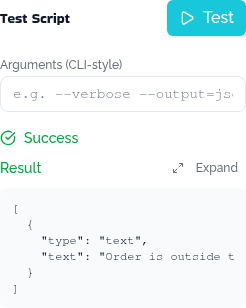
If the script reads command-line arguments, type them into Arguments (CLI-style), the way you would pass them on a command line.
Check it worked
A Success status shows the script's Result: what it printed or returned, as the same content array an agent would receive. A failing script shows an Error status instead, with the exception and exit code under Error Details.
Next
- Test a role in Studio, to see the script called as part of a real conversation.
- Build a skill, to fix what you find.