

Set a skill's value per use
Put a value on one use of a skill, and read the total it adds up to in Activity.
You declare what one use of a skill is worth, and Skilder adds up every use from then on.
Before you start
- You own the skill and are a contributor, or you are a workspace admin. Anyone else sees the value but no Edit value button.
- The amount is in your workspace currency,
CHFunless an admin changed it in Workspace settings. Changing the currency relabels every figure. It converts nothing.
Open the skill
On Capabilities > Skills, click the skill. Its Value section sits in the panel on the right, under Used by.
Enter the value
Click Edit value and type an amount in Value per use, zero or more. Leave the field empty to clear the value.
The value is not part of the skill's draft, so there is nothing to publish.
Choose what happens to past uses
Leave Also update past values unchecked to price only the uses that come next. Check it to re-stamp every past use with the new value, including the uses counted before any value existed.
Click Update. With the box checked, confirm with Re-value all uses.
Also update past values overwrites the value each past use recorded, and every total computed from it. It cannot be undone.
What counts as a use
A use is an agent learning this one skill. Skilder counts at most one per agent session, so an agent that learns the skill three times in one session counts once. With session tracking off, each learn counts.
These never count:
- learning a role, or reading one of the skill's references
- the tool calls and scripts the agent runs after learning it
Frozen values
Skilder writes the current value onto each use the moment it is recorded. Changing the value later leaves those uses as they were, so the total is the sum of what each use recorded, not today's value times the count.
The Value section lists four figures:
- Value per use: what the next use records, or Not set.
- All uses: every use counted so far.
- Priced uses: the uses that recorded a value.
- Total value: the sum of those recorded values, over all time.
Priced uses and Total value appear once a use is counted. Notes under the figures say why the total can differ from today's value times the uses:
- Unpriced uses carry no value and count as zero, usually because they were recorded before a value was set. To price them, edit the value and check Also update past values. If no value is set, set one first.
- The value changed over time, so priced uses keep the older value they recorded.
- The value was cleared, so priced uses keep what they recorded and the total stays.
Read it in Activity
On Activity, Total value on the Value tab adds up every priced use. Pricing coverage beside it shows priced uses, unpriced uses and all uses: unpriced uses carry no value and count as zero, so the total reads low. Top skills by value shows each skill's total with how many of its uses are priced. These figures cover the selected time window, while a skill's Value section covers all time.
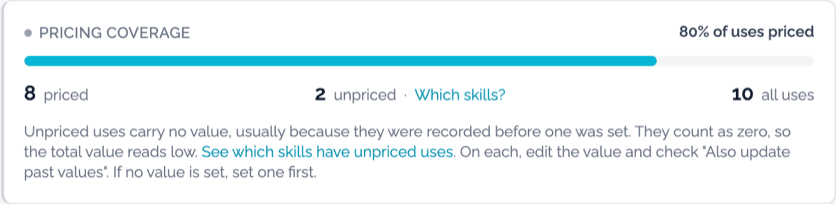
Click Which skills? beside the unpriced count. It opens Skills ranked by Unpriced uses. To price a skill's history, edit its value and check Also update past values. If no value is set, set one first.
An Unattributed row holds the unpriced uses of skills deleted since. It has no skill to open, so its uses stay unpriced.
A role's Overview tab also shows Total value for the last 30 days: the value of the priced uses made while an agent held that role.
Next
- Ask your agent about activity, to read value without opening the app.