

Profile and security
Update your profile, set or change your password, and delete your account.
Your profile page holds your personal details, sign-in security, and the option to leave a workspace or delete your account. Every member reaches it, regardless of workspace role.
To open it, click your email at the bottom of the sidebar and choose Personal settings. The page is titled Profile.
Tabs
| Tab | Contents |
|---|---|
| Profile | Your name and avatar, leaving a workspace, deleting your account. |
| Security | Sign-in methods, your password, active sessions. |
| Integrations | Your personal connections. See Personal integrations. |
| API Keys | Your personal keys, scoped to one workspace. Used to authenticate the public REST API. |
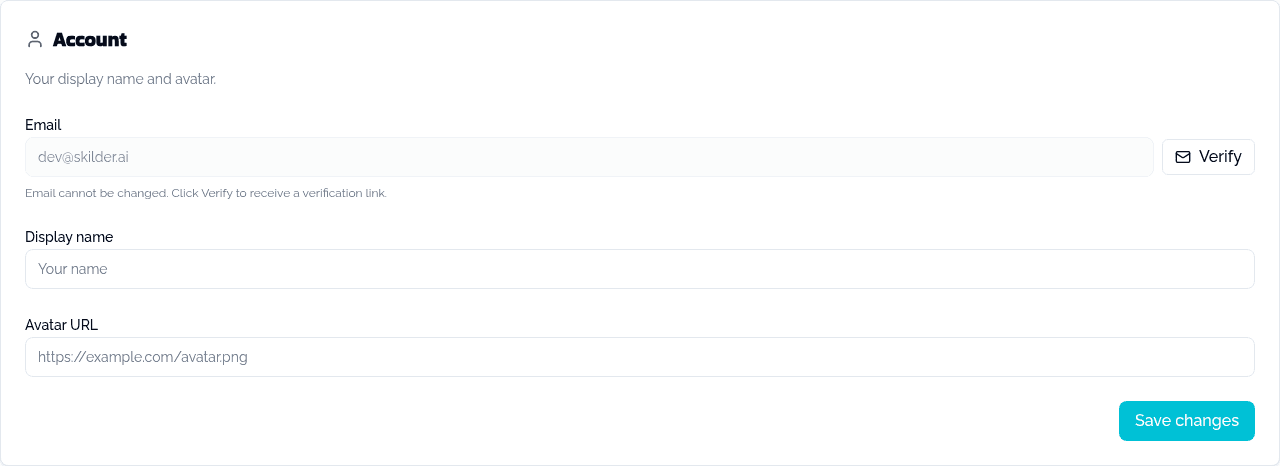
Profile
| Field | Editable | Notes |
|---|---|---|
| No | Shows a Verified badge, or a Verify button that sends a verification link. | |
| Display name | Yes | |
| Avatar URL | Yes | A link to an image. |
Click Save changes to apply.
Password
If you already have a password, the Security tab shows Change Password: your current password, a new one, and a confirmation.
If you signed up through OAuth only, it shows Add a Password instead: a new password and a confirmation. Once set, you can also sign in with email and password.
Sign-in methods
Lists the OAuth identities (Google, GitHub, Microsoft) you can sign in with. Click Block on any of them to stop it from signing you in; blocked methods stay listed with an Unblock action, so blocking is reversible. You always need at least one way to sign in: blocking your only method is refused until you set a password.
Active sessions
Sign out of all sessions (including this one) immediately signs you out on every device. Use it if you suspect unauthorized access to your account.
Leave a workspace
Click Leave workspace and confirm. You lose access to that workspace's skills, roles and tools, and any API keys you created there are revoked. Your account and your other workspaces are unaffected.
If you are the workspace's only admin, you cannot leave: promote another member to admin first, or delete the workspace from Workspace settings.
Delete your account
Type your email address to confirm, then click Delete my account.
Deleting your account is irreversible. It wipes your conversations across every workspace, removes you from every team, and deletes any workspace where you are the sole admin.